The best way to get more Google reviews is to ask every completed customer soon after the service, on the same channel they already used, with a direct review link. Automation helps because timing and consistency matter more than clever wording.
Why do Google reviews affect local SEO so much?#
For local businesses, Google reviews influence trust, click-through, and local pack behavior. They are also one of the first things a customer checks before calling, booking, or asking for a quote.
More reviews do not produce higher rankings by themselves, but review volume, freshness, rating, and response quality all help customers decide whether to click. A business with recent, detailed reviews usually earns more trust than one with a thin or stale profile.
Most businesses do not have a review problem. They have a review process problem. The service happened, the customer was happy, and nobody asked at the right moment.
Why are you not getting enough Google reviews?#
Three reasons:
- You forget to ask. After a job well done, you are already on to the next customer. Asking for a review is not in your workflow. It is an afterthought that rarely happens.
- You ask at the wrong time. Sending a review request three days after service is too late. The emotional high is gone. The customer has moved on. They might still leave a review, but the odds drop fast.
- You make it too hard. "Please leave us a review on Google" is vague. The customer has to find your listing, figure out how to leave a review, and write something. Too many steps. They bail.
The fix for all three problems is the same: automate the ask at the right moment with a direct link, then make sure every completed customer gets the same fair request.
When is the best time to ask for a Google review?#
There is a short window after every service where the customer is most likely to respond. The result is fresh, the experience is still top of mind, and they do not need to reconstruct what happened. For most local services, that window is 30 minutes to 2 hours after completion.
Ask during this window because the customer still remembers the details. Ask days later and the request feels less connected to the service, which usually lowers completion.
The timing trick is simple: trigger your review request message immediately after the service is complete. Not when you remember. Not at the end of the week. Right then.
For service businesses (salons, restaurants, contractors, clinics), this means sending the message within an hour of checkout or service completion. For ecommerce, it means sending after delivery confirmation, not after purchase.
How do you automate review requests without sounding pushy?#
Nobody wants to feel pressured into leaving a review. The key is making it feel like a natural part of the conversation, not a demand.
Here is a message template that works:
"Hey [name], thanks for coming in today! We loved working with you. If you have 30 seconds, a Google review would mean the world to us. Here is the link: [direct review link]. No pressure at all. See you next time!"
Why this works:
- It is personal. Uses their name, references the visit.
- It is specific. "30 seconds" sets expectations. It is not a big ask.
- It is direct. One link. One click. No hunting for your listing.
- It is low pressure. "No pressure at all" removes the obligation feeling.
Getting your direct review link#
Go to Google Maps. Find your business. Click "Write a review." Copy that URL. This is your direct review link. When customers click it, they land directly on the review form. No searching. No extra steps.
Google Review Automation: The Setup#
Here is how to build a review engine that runs without you:
Step 1: Define your trigger#
What marks the end of service? A completed appointment. A delivered order. A closed support ticket. This event triggers the review request.
Step 2: Set the delay#
Immediately after is ideal, but 30 to 60 minutes works well too. The customer has had time to process but has not forgotten the experience.
Step 3: Choose the channel#
Send the review request on the same channel the customer used to communicate with you. If they booked via WhatsApp, send the request on WhatsApp. If they came through Instagram DMs, use Instagram. Familiar channels get higher response rates.
Step 4: One message, one link#
Do not send a paragraph. Do not ask them to rate you on five different platforms. One message. One review link. Keep it simple.
Step 5: Follow up once (only once)#
If they do not leave a review within 48 hours, send one gentle follow-up. "Hey, just a friendly reminder about the review link if you get a chance!" After that, stop. Two messages maximum. Do not send a third message.
Should you send the review link only to happy customers?#
No. If you only invite happy customers to leave a public review, you are drifting into review gating, which is exactly what Google warns against. The safer system is simple: ask every completed customer for feedback, send every completed customer the same review invitation, and separately route complaints to your team so the issue gets handled fast.
If you want an added service-recovery step, send a short "how did everything go?" message to everyone first. Then follow with the same review invitation across the board. That keeps your process fair, compliant, and easy to defend.
The Compound Effect of Consistent Reviews#
Here is where it gets exciting. Most businesses get reviews in bursts. A few come in, then nothing for months. Google notices this. Consistent, steady reviews signal an active, trustworthy business.
If you automate the process and get just 2 new reviews per week, that is 104 reviews per year. In 12 months, you go from a 15-review listing to a 119-review listing. That larger, fresher profile gives customers more proof before they call, book, or ask for a quote.
The goal is steady review velocity, not a one-week spike. Google and customers both read consistency as a sign that the business is active.
What to Do With Negative Reviews#
You will get a 1-star. It happens. Here is how to respond:
- Reply publicly within 24 hours. Brief, professional, no defensiveness.
- Acknowledge the issue, apologize, and invite them to discuss offline.
- Do not argue in the reply. Anyone reading this is judging your professionalism, not theirs.
- Internally, fix the root cause. One bad review survived is one fewer to come.
Start Building Your Review Engine#
You do great work. Your customers are happy. The missing step is the ask. Automate it. Make it easy. Make it consistent. The reviews will come.
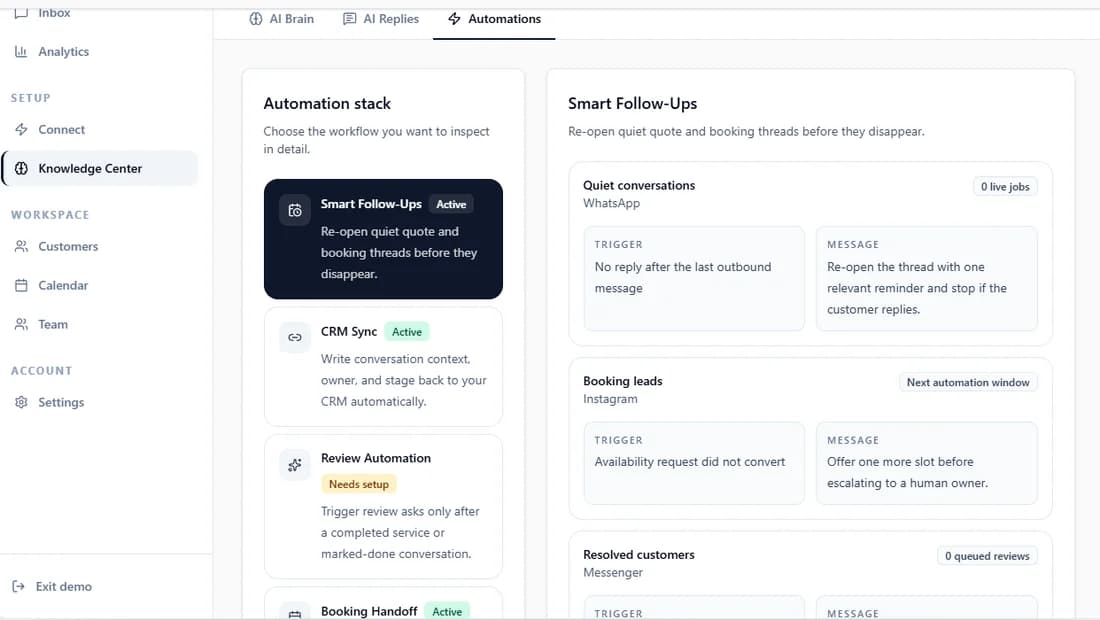
Instant Reply queues review requests from completed conversations with the timing, delivery-channel, and stop rules you set. The workflow stays in the same thread on the channel the customer prefers. Start your free trial and build a steady Google review engine, or see how review automation works.