
How to Connect WhatsApp to Your CRM in 2026 (6 Tools + Setup Steps)
About the Author
Saif Farroukh
Co-Founder at Instant Reply
Co-founder of Instant Reply. 6+ years in B2B SaaS growth and WhatsApp business solutions across MENA and LATAM markets. Focused on helping SMBs close more deals through conversational automation.
Published: March 31, 2026
Last updated: June 12, 2026
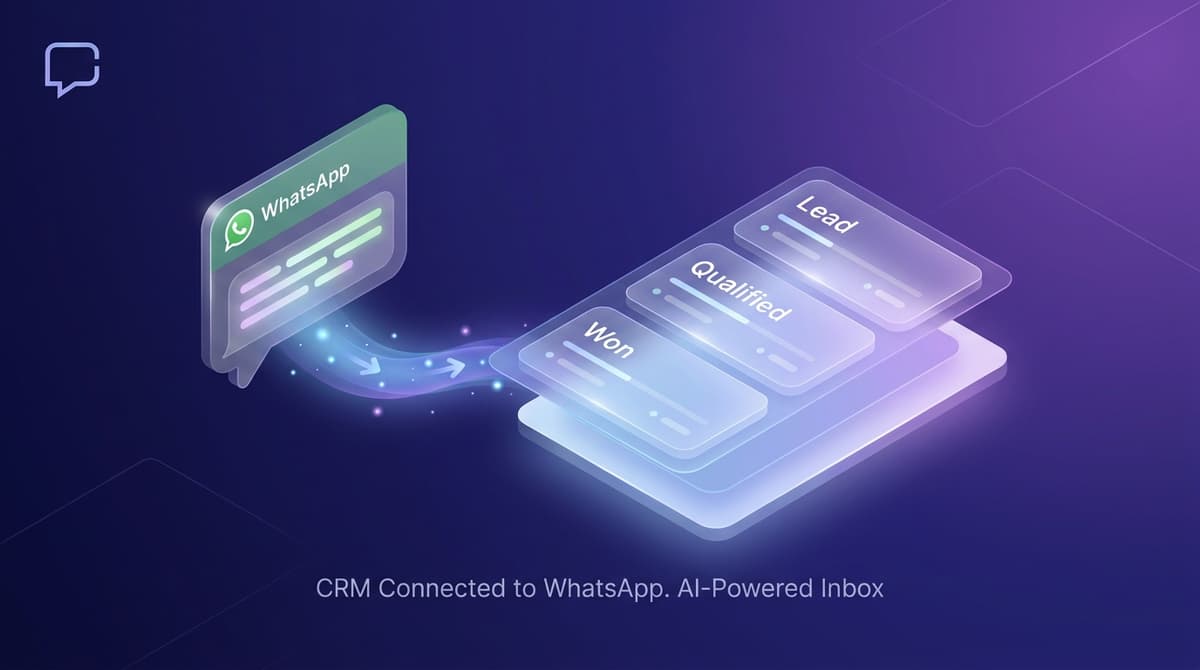
390 businesses per month search for "CRM for WhatsApp," and most of them are really asking the same question: what is the best CRM for WhatsApp Business? WhatsApp is where their customers communicate, but their CRM has no idea those conversations are happening.
The disconnect is expensive. A lead messages on WhatsApp, your team replies manually, eventually qualifies them, then manually creates a CRM record with incomplete information. Half the context is lost. Follow-ups happen in two places. Revenue leaks between the tools.
This guide covers the 6 best CRM options for WhatsApp in 2026, how the integration actually works, and which one fits your situation.
What to Look For in a WhatsApp CRM Integration
Not all WhatsApp CRM integrations are equal. Here is what separates a real integration from a checkbox feature:
- Automatic contact creation. When a new number messages you on WhatsApp, the CRM should create a contact automatically, not require manual entry.
- Full conversation sync. Every WhatsApp message should appear in the contact timeline, not just a link to an external inbox.
- Two-way messaging. Reps should be able to send WhatsApp messages directly from the CRM without switching tabs.
- Automation triggers. WhatsApp activity should be able to trigger workflows -- moving a deal stage, assigning to a rep, sending a follow-up task.
- Team inbox management. Multiple reps handling WhatsApp for the same account without conversation collisions.
The 6 Best CRMs for WhatsApp in 2026
1. Instant Reply -- Best WhatsApp-First CRM
Instant Reply is purpose-built for businesses where WhatsApp is the primary sales channel. Rather than bolting WhatsApp onto a traditional CRM, it starts with WhatsApp and builds CRM functionality around it.
What makes it different:
- WhatsApp Business API built in -- no separate BSP account needed
- WhatsApp conversations stay in a shared inbox with contact context and internal lead stages
- AI replies handle first contact on WhatsApp 24/7, qualifying leads before human handoff
- Lead management with deal stages, notes, and assignment built into the inbox
- Pipeline view showing all WhatsApp leads by stage
- Smart follow-ups re-engage leads who go quiet without manual intervention
- Also covers Instagram DMs, Facebook Messenger, and email in the same interface
Best for: Service businesses, SaaS companies, and e-commerce stores where sales conversations happen primarily on WhatsApp.
Pricing: Growth plan at $129/month includes WhatsApp, AI, CRM, and all channels. See full pricing.
2. HubSpot CRM -- Best for Existing HubSpot Users
HubSpot's native WhatsApp integration launched in 2023 and has matured significantly. Conversations sync to contact records, you can send templates from the CRM, and WhatsApp activity can trigger HubSpot workflows.
Key features:
- WhatsApp messages appear in the HubSpot contact activity timeline
- Send WhatsApp messages directly from a contact record
- Workflow automation triggered by WhatsApp message receipt or reply
- Works with HubSpot's full suite (deals, sequences, reporting)
Best for: Teams already using HubSpot who want WhatsApp as one channel among many.
Pricing: WhatsApp integration requires Professional tier ($800+/month for the full suite). The WhatsApp inbox itself is a separate inbox channel add-on.
Limitation: HubSpot's WhatsApp inbox is designed for support, not sales. Team inbox management and AI replies are limited compared to purpose-built WhatsApp tools.
3. Zoho CRM -- Deepest Native WhatsApp Integration in Traditional CRM
Zoho CRM has one of the strongest WhatsApp integrations of any traditional CRM. WhatsApp is available as a communication channel directly inside Zoho, with two-way messaging, conversation history on contact records, and workflow automation.
Key features:
- Send and receive WhatsApp messages from inside Zoho CRM records
- Full conversation history on contact and lead records
- Blueprint workflows triggered by WhatsApp events
- Zoho SalesIQ handles the live chat component with WhatsApp routing
Best for: Teams that prefer Zoho's ecosystem and want a well-integrated WhatsApp channel inside a full CRM.
Pricing: Zoho CRM Professional from $23/user/month. WhatsApp channel requires WhatsApp Business API access separately.
4. Kommo (formerly amoCRM) -- Best Pipeline-First WhatsApp CRM
Kommo integrates WhatsApp directly into a sales pipeline interface (full breakdown in our Kommo comparison). Every WhatsApp conversation becomes a lead card in the pipeline, which makes it intuitive for sales-focused teams who think in terms of deals rather than support tickets.
Key features:
- WhatsApp conversations appear as deal cards in the Kanban pipeline
- Reply to WhatsApp directly from the deal card
- SalesBot for automated WhatsApp sequences
- Good for service businesses that close deals via messaging
Pricing: From $15/user/month.
5. Salesforce with WhatsApp for Salesforce -- Enterprise Option
Salesforce's WhatsApp integration via Marketing Cloud or Service Cloud is enterprise-grade. It handles high-volume WhatsApp at scale with full Salesforce workflow integration, AI-powered routing, and compliance features.
Best for: Enterprise teams already on Salesforce who need WhatsApp at scale.
Pricing: Significant -- Salesforce licenses plus WhatsApp messaging costs. Not competitive for small teams.
6. Pipedrive + WhatsApp Integration -- Best for Simple Pipeline Management
Pipedrive does not have native WhatsApp support but connects via Zapier or dedicated integrations. Conversations can sync to deal records, and you can send WhatsApp via connected inboxes.
Best for: Teams already using Pipedrive who want basic WhatsApp visibility in their pipeline without switching CRMs.
Pricing: Pipedrive from $15/user/month plus integration costs.
How WhatsApp CRM Integration Works
The technical flow is the same across all these tools:
- A customer sends a WhatsApp message to your business number.
- The WhatsApp Business API sends a webhook notification to your CRM or inbox platform.
- The platform checks if the phone number matches an existing contact. If yes, it logs the message to that contact. If no, it creates a new contact record.
- The message appears in the CRM contact timeline and in the team inbox.
- A rep replies from the CRM interface. The reply sends through the WhatsApp API to the customer's phone.
- Any automation rules fire -- deal stage changes, task creation, notifications to the assigned rep.
The quality of the integration depends on how well the platform handles step 3 (contact matching), step 5 (reply experience), and step 6 (automation depth).
WhatsApp CRM vs WhatsApp Inbox: What's the Difference?
A WhatsApp inbox tool (like the WhatsApp Business App) handles messaging but has no CRM functionality. A WhatsApp CRM integration connects messaging to your pipeline, contacts, and deal management.
The right approach depends on your team size and use case:
- Solo or very small team, under 20 conversations/day: WhatsApp Business App may be enough initially.
- Team of 2-20 people, WhatsApp as primary sales channel: Purpose-built WhatsApp CRM like Instant Reply.
- Team already using HubSpot/Zoho, WhatsApp as one of several channels: Native integration within your existing CRM.
- Enterprise with complex CRM workflows: Salesforce or HubSpot Enterprise with WhatsApp integration.
Setting Up a WhatsApp CRM That Actually Works
Three things that make the difference between a WhatsApp CRM that increases revenue and one that just adds complexity:
1. Instant first response. The CRM needs to respond to every inbound WhatsApp message within seconds, not hours. Use AI auto-replies to handle first contact and qualify leads before routing to a human. Every hour of delay costs you leads. See how AI auto-replies work for the response flow.
2. Automatic lead creation. Every new WhatsApp conversation should create a CRM lead automatically with the phone number, name (if provided), and conversation context. Manual data entry kills adoption -- if reps have to enter leads by hand, they will not do it consistently.
3. Follow-up automation. When a qualified lead goes quiet after showing interest, the CRM should fire a follow-up automatically. Not a generic "just checking in" -- a contextual message that references what they asked about. See smart follow-up features for how this works in practice.
Start a free 10-day trial on Instant Reply and connect your WhatsApp Business API in minutes. The CRM features are built in -- no separate tool required. Or take the product tour to see the pipeline and inbox working together before signing up.
Official sources to verify changing details
Platform rules, prices, eligibility, and interface labels can change. We use these primary sources to check the parts of this guide that may move:
Frequently asked questions
Quick answers to what people ask most.
- Instant Reply is the best CRM for teams where WhatsApp is the primary sales channel. It combines a WhatsApp inbox, AI auto-replies, and CRM pipeline in one tool. HubSpot and Zoho CRM are better for teams that need WhatsApp as one of many channels inside a full CRM suite.
- Yes. HubSpot has a native WhatsApp integration that syncs conversations to CRM contacts and deals. It requires a paid HubSpot plan and a WhatsApp Business API account. The integration works well but WhatsApp is not HubSpot's primary use case -- it is one channel among many.
- Yes. Zoho CRM has one of the deepest native WhatsApp integrations of any traditional CRM. Conversations sync to contacts, you can send WhatsApp messages directly from Zoho, and you can build automation workflows triggered by WhatsApp activity.
- A WhatsApp CRM integration syncs WhatsApp conversations to your CRM so that every message is linked to a contact record, leads are created automatically from new conversations, deal stages can be updated based on conversation outcomes, and your sales team can manage WhatsApp from inside the CRM interface.
- Yes. Instant Reply includes built-in lead management and pipeline features alongside the WhatsApp inbox. Small to mid-size teams often find that Instant Reply replaces both their inbox tool and their CRM for WhatsApp-driven sales. For complex CRM needs with many integrations, pairing Instant Reply with HubSpot or Zoho via native integration works well.
- WhatsApp CRM integration works through the WhatsApp Business API. When a customer messages you, the API sends a webhook to your CRM or inbox platform, which creates or updates the contact record, logs the message, and triggers any automation rules you have set up. Two-way sync means replies from your CRM also send through WhatsApp.
10-day Pro trial · no credit card
Give every DM a faster first response.
Instant Reply drafts replies for WhatsApp, Instagram, and Messenger, then keeps humans in control for approvals, exceptions, and booking handoff.
Keep reading
WhatsApp vs WhatsApp Business: What's the Actual Difference?
8 min read
How to Contact WhatsApp Support (2026): Business and Personal Accounts
6 min read

WhatsApp CRM Integration Without Middleware: Architecture Worksheet
12 min read
How to Schedule Messages on WhatsApp in 2026 (Every Method That Works)
10 min read
ManyChat WhatsApp in 2026: Current Pricing, Limits & Setup
11 min read
How to Schedule WhatsApp Messages in 2026 (Without Sketchy Apps)
7 min read
Explore Instant Reply
More tools and solutions
Industry solutions