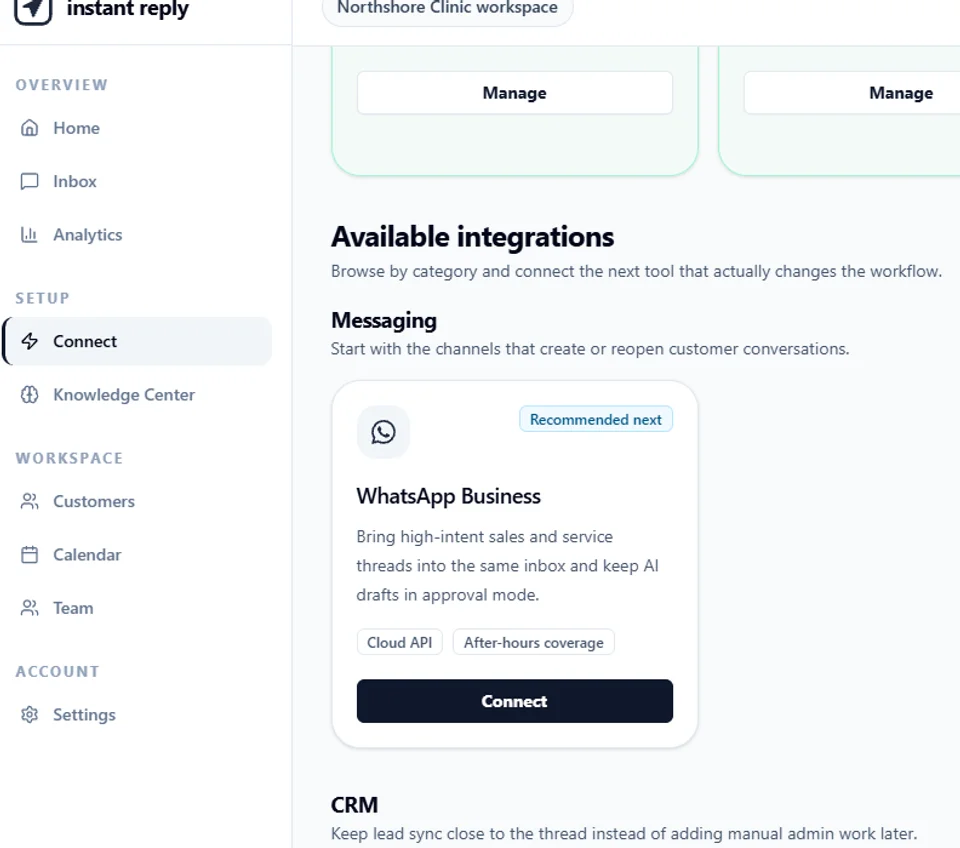
This starts from the same real WhatsApp Business connect card documented in the plain connect guide, captured from the live, read-only public demo at instantreply.co/demo. This time the question is narrower: what happens if the number behind that Connect button is already active in the WhatsApp Business app, the one your team already replies from on a phone.
Same card, same screen#
WhatsApp Business sits in Available Integrations, under Messaging, on the Connect screen filed under Setup. The card looks identical no matter what kind of number you're about to connect: a Recommended next badge, Cloud API and After-hours coverage tags, and one description: "Bring high-intent sales and service threads into the same inbox and keep AI drafts in approval mode."
What the public demo does and doesn't show#
Checked directly, live: clicking Connect on this card in the demo does nothing, on purpose, and no coexistence-specific dialog, badge, or choice appears anywhere on the Integrations screen. That's not a gap in this guide. It's the honest state of a read-only replica: the demo's own banner says "nothing you click sends anything," and the fork between a brand-new number and one already running in the WhatsApp Business app only happens once Meta's own authorization actually starts, which requires a real Meta business account the public demo deliberately doesn't have.
So there is no separate "coexistence mode" screenshot to show here that isn't this one. If a future version of the demo adds one, this guide will show it. Until then, the honest answer is that the entry point is this single card, and the coexistence-specific behavior lives on the other side of it.
What actually happens on the other side of Connect#
In a real workspace, clicking Connect on this same card starts Meta's official WhatsApp Cloud API authorization for your own number, the same as it does for a brand-new one. The distinction that matters, which number you're connecting, gets asked before Meta's screens do: a number already active in the WhatsApp Business app is routed through Meta's coexistence-specific signup path instead of the standard one, so the app keeps working on the phone it's installed on while Instant Reply connects through the API alongside it. A genuinely new or unused number goes through the standard path with nothing to coexist with. Neither path is reachable from the read-only demo, which is exactly why this guide doesn't screenshot it and instead documents it here, plainly, as what the real flow does.
What Meta's own documentation says you actually keep, and lose#
Coexistence is Meta's mechanism, not Instant Reply's, so what it preserves and drops is fixed regardless of which platform connects the number. Per Meta's own developer documentation:
- Up to 180 days of 1:1 history syncs on approval. Group chat messages are excluded entirely.
- Media older than 14 days before onboarding may not carry over as usable media, even inside the synced window.
- Disappearing messages, view-once messages, and live location get disabled for individual chats once coexistence is active.
- Broadcast lists become read-only. Visible, not sendable, from that point on.
- Throughput is capped at 20 messages per second, combined across the app and the API on that number.
- The WhatsApp Business app must be version 2.24.17 or later before the number is eligible.
Every one of these is documented in full, with sourcing, in this site's own deep dive on what actually syncs. That post is the reference; this one is the walkthrough of where the button lives and what it starts.
The deadline that isn't specific to coexistence#
Coexistence is set up through Meta's Embedded Signup flow, and both the coexistence onboarding page and the general Embedded Signup overview carry the same notice from Meta: Embedded Signup v2 is deprecated October 15, 2026, and any integration still running on it needs to migrate to v4 before that date. That applies to whichever platform runs your WhatsApp connection, not specifically to InstantReply, and it's worth confirming directly with your platform rather than assuming.
Four things to check before you click Connect#
- Is the WhatsApp Business app on version 2.24.17 or newer? Coexistence isn't offered below that version.
- Does your actual send volume fit under 20 messages per second, combined across the app and the API, at your current load and where you expect to be in a year?
- Does the team rely on WhatsApp group chats? That workflow doesn't carry over once coexistence is active.
- Who on the team still needs the phone app after this? Coexistence exists specifically so that person keeps working from it while everything else moves into the shared inbox.
The three steps#
- Open Connect from the sidebar, under Setup, and scroll to WhatsApp Business under Available Integrations, Messaging.
- Click Connect. In your own workspace, this starts Meta's real authorization and asks which kind of number you're connecting. Pick the option that matches a number already active in the WhatsApp Business app to keep it running.
- Run the four-point check above before relying on it, especially the throughput cap if any part of the plan involves broadcast-style sending on that same number.
Once it's connected, coexisting WhatsApp threads land in the same shared inbox as every other channel, and the phone still works exactly as it did before, for whoever on the team still needs it.
Want to see the real connect card this guide is built from? Open the Connect screen in the interactive demo and scroll to WhatsApp Business under Messaging. For the full mechanics of what syncs and what doesn't, read WhatsApp coexistence in 2026: what actually syncs. To connect any WhatsApp number through Instant Reply, standard or coexisting, the setup runs through the WhatsApp API integration.