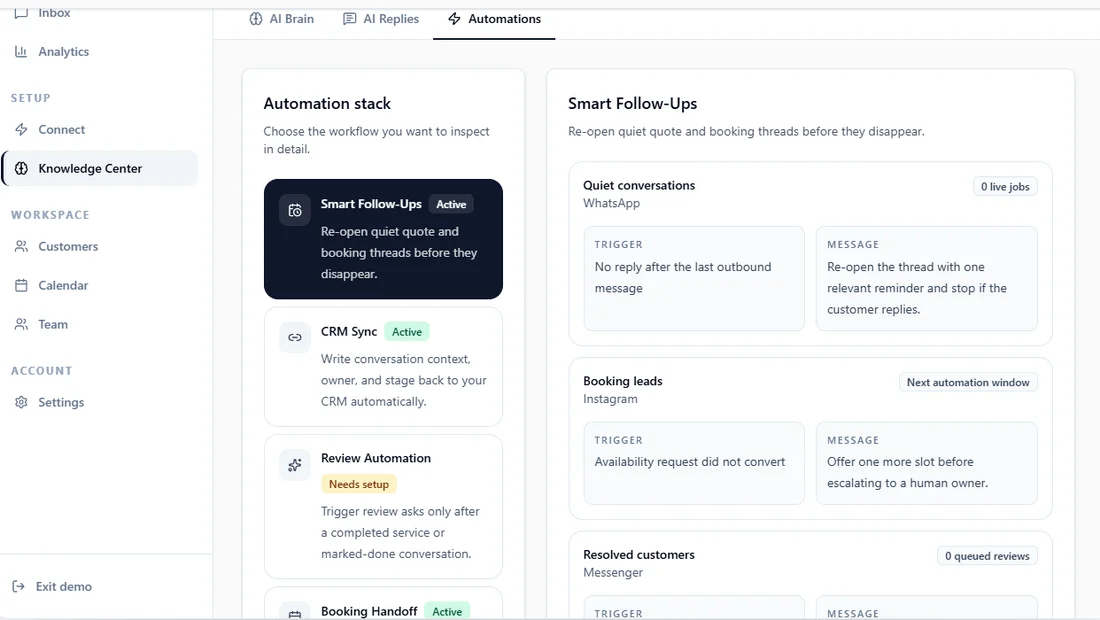
This is the real Automations screen inside Instant Reply, captured from the live public demo at instantreply.co/demo. Here's exactly what a follow-up rule looks like before you turn one on.
Where Smart Follow-Ups lives#
The sidebar calls this screen Knowledge Center, filed under Setup. The home dashboard's own shortcut button for the same screen calls it Open The Brain. Both point at the same place. Inside, there are three tabs: AI Brain, AI Replies, and Automations. Automations is where every rule-based workflow lives, not just follow-ups.
Four automations, not one#
The left column, labeled "Automation stack," lists four workflows: Smart Follow-Ups, CRM Sync, and Booking Handoff are marked Active. Review Automation is marked "Needs setup," a visible reminder that not every automation configures itself. Follow-ups is one automation among four here, not a standalone feature bolted on the side.
The three rules already running#
Selecting Smart Follow-Ups shows three rules, one per channel, each with its own trigger and message:
- Quiet conversations, WhatsApp. Trigger: "No reply after the last outbound message." Message: "Re-open the thread with one relevant reminder and stop if the customer replies."
- Booking leads, Instagram. Trigger: "Availability request did not convert." Message: "Offer one more slot before escalating to a human owner."
- Resolved customers, Messenger. Trigger: "Review request sent after completion." Message: "Send only the intended reminder sequence and stop after the click."
Each rule also shows a small live counter next to it: "0 live jobs," "Next automation window," or "0 queued reviews" in this demo workspace. Those counters show whether any conversation currently matches the trigger, not whether the automation works. In a real workspace with active conversations, those counts move.
What a rule actually is#
Each rule pairs one trigger with one message, and the wording makes the stop condition explicit rather than leaving it implied. The "Quiet conversations" rule says it plainly: "stop if the customer replies." That detail matters more than the trigger. It's the difference between a follow-up and a nag.
Follow-ups sit next to CRM Sync and Booking Handoff on the same Automations tab, and every reply an automation sends still lands in the same shared inbox as everything else.
Want to see this exact screen live? Open the Automations tab in the interactive demo and click through Smart Follow-Ups, CRM Sync, Review Automation, and Booking Handoff yourself.