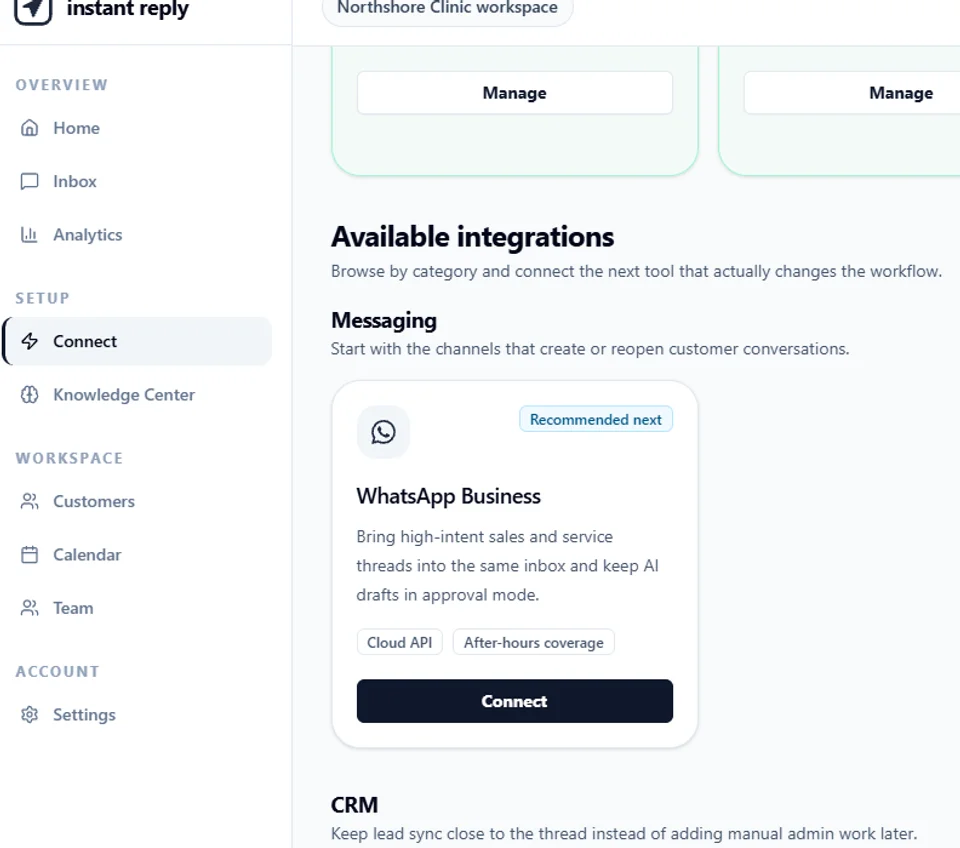
This is the actual WhatsApp Business connect screen inside Instant Reply, not a mockup. It's captured from the live, read-only public demo at instantreply.co/demo, where anyone can click through the real interface before signing up.
Where the WhatsApp card lives#
Connecting a channel happens on one screen. The sidebar calls it Connect, filed under Setup, one click away from anywhere in the workspace. Inside, integrations are grouped into sections: Active integrations already running, Available integrations ready to turn on, and Upcoming integrations still on the roadmap. WhatsApp Business sits in Available Integrations, under Messaging.
At the top of this same screen, a banner sums up the workspace's actual state: "Your workspace is half configured, not finished. Messenger, HubSpot, and Google Calendar are already doing useful work. Instagram still needs attention, and WhatsApp Business is the cleanest next channel to connect." That's not generic onboarding copy. It's the workspace describing its own connected channels back to you.
What the card tells you before you click anything#
The card carries a Recommended next badge in this demo workspace. Under the description sit two highlight tags: Cloud API and After-hours coverage. The description itself reads: "Bring high-intent sales and service threads into the same inbox and keep AI drafts in approval mode." That line is the literal text next to the button, not marketing copy layered on top afterward.
The same screen lists other channels you can add the same way: Pipedrive and Outlook are "Ready to connect," while Salesforce, Calendly, Notion, and Airtable are marked "Coming soon" with a waitlist button instead of a Connect button.
What Connect actually starts#
The Cloud API tag on the card is the tell: WhatsApp Business connects through Meta's official WhatsApp Business Cloud API, not a browser plugin or an unofficial scraper. In a real workspace, clicking Connect starts that official authorization with Meta. On this page, it doesn't do anything, on purpose. The demo's own banner says it plainly: "Read-only, nothing you click sends anything." To see the actual Meta authorization screen, you need a real Instant Reply workspace, which the trial gives you without a card.
The three steps#
- Open Connect from the sidebar, under Setup.
- Scroll to Available Integrations, then Messaging, and find the WhatsApp Business card.
- Click Connect to start Meta's Cloud API authorization for your own WhatsApp Business number.
Once it's connected, new WhatsApp threads land in the same shared inbox as Instagram and Messenger, and AI reply drafts stay in approval mode until you decide to change that, per the card's own wording.
Want to see the exact screen this guide describes, live? Open the Connect screen in the interactive demo and scroll to WhatsApp Business under Messaging.